I Changed My Mind. Did My AI?
I corrected my assistant from teal to violet. Was the fix saved, supplied, and understood, and did the work that depended on it change too?
I spend a lot of time testing different AI models, so there's a bit of fragmentation happening sometimes, due to the nature of what I'm doing. I'm also working on my own assistant, and as I experiment with how it remembers things, well, here we are.
Here is an attempt at organizing my own private notes into something that I can pass on to others. By doing this, I think it will help me learn.
I want an AI assistant to remember enough that I can get on with the work. The project I’m building. The decisions we’ve already made. The way I like a draft to sound. Having to explain all of that again gets old pretty quickly.
But once an assistant starts carrying information from one conversation into another, I have another question: what happens when I change something?
Here’s a hypothetical. I tell an assistant that my project uses teal. We discuss the layout, make a few decisions, and it saves that information. A week later, I change the color to violet and tell it to remember the update.
Then I open a new conversation, ask for a landing-page draft, and teal shows up again.
What went wrong?
The correction might never have been saved. It might have been saved but left out of this response. An old conversation might have come back through search. Or the assistant might have received both versions and chosen the wrong one.
“Memory failed” covers several different problems there. Each would need a different fix.
So I find it useful to ask three questions in order: was it saved, was it supplied, and was it understood?
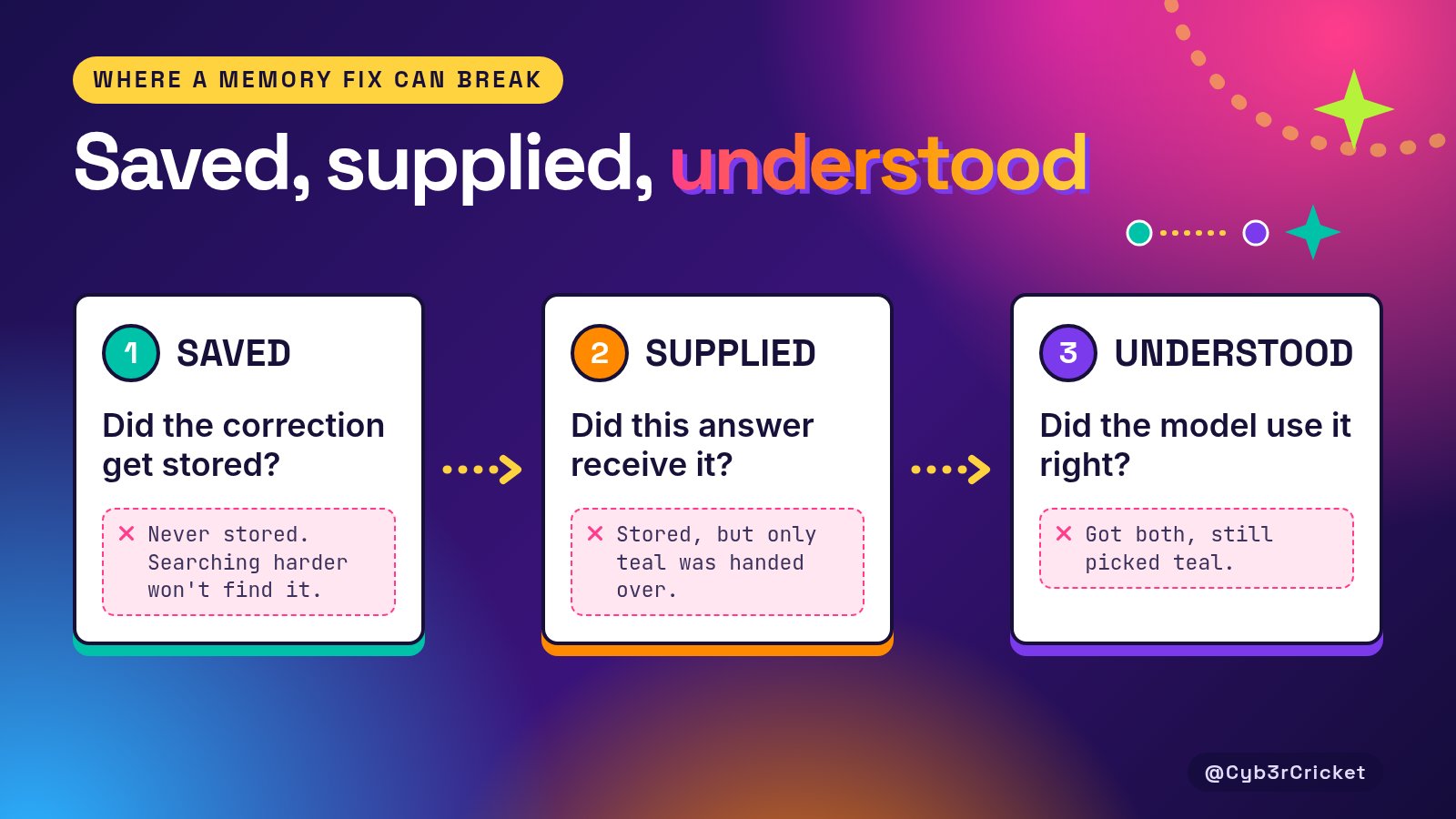
If violet never entered storage, searching harder won’t retrieve it. If it was saved but the response only received teal, the model had incomplete evidence. If both arrived and the model still picked teal for the current page, saving another copy of violet won’t fix the actual problem.
That gives me a better way to investigate a bad answer. I can look for where the correction disappeared or where the interpretation went wrong, instead of typing “remember this” again and hoping it sticks.
Saved
The word memory makes this sound more familiar than it really is. When I remember a project, I have some sense of how its decisions connect. With an AI assistant, that information has to reach the model through whatever process the application provides.
That might be the current conversation, a saved fact, a generated summary, a profile, or a search through earlier chats. Standing instructions can carry preferences and project information too. Several of those can be used together.
A memory setting tells me that some kind of continuity is available. It doesn’t tell me what gets kept, when it gets selected, or how disagreements are handled.
And disagreements aren’t always errors.
Teal was the right answer last week. Violet is the right answer now. If I ask what we started with, I want teal. If I ask what the next page should use, I want violet.
Deleting every old fact would make it harder to explain how the project got here. Keeping everything without its context creates a different problem: the assistant has several plausible answers and has to work out which one I’m asking for.
There are documented ways to keep the history while marking what replaced it. Mem0’s Dream feature can mark a memory as superseded and link it to the newer one. Superseded memories still show up in normal searches unless you ask for current ones only with latest_only=true.
Where a statement came from matters, too. A preference I explicitly saved, a guess an assistant made from my conversations, and something it said about me itself are different things, and those origins should stay visible. If an assistant invents a detail and then stores its own statement, a later retrieval shouldn’t turn that mistake into evidence.
Supplied
Saving is only the first step. The important question is what reaches the assistant when it answers.
Source displays help here, with one limit. A record listed beside an answer shows what was supplied. It doesn’t show how the model used that record.
Dates matter at this step, too, but only if we know what a date represents. Imagine I upload last month’s project notes today. The upload is new. The decisions inside those notes are old. Treating the newest stored item as the newest decision would get that backwards.
Understood
Even when both colors arrive, the assistant still has to work out which one I mean.
LongMemEval breaks memory into indexing, retrieval, and reading, and tests abilities including knowledge updates and temporal reasoning. Its tests of ChatGPT and Coze used a smaller, simplified setup and ran in the first two weeks of August 2024, so I wouldn’t use them to rank today’s assistants. What I take from it is that retrieving information and reasoning correctly over it are separate parts of the job.
Preferences add another complication: scope.
I can prefer short answers most of the time and still want a detailed explanation of something difficult. “Go deeper on this one” doesn’t mean every future answer should be longer. Asking for an unusual writing style while experimenting doesn’t make it my permanent voice.
Sometimes I’m replacing a preference. Sometimes I’m making an exception. Sometimes I’m exploring an idea I haven’t adopted.
The assistant needs to preserve those distinctions. Otherwise, a request that made sense in one conversation can keep turning up where it doesn’t belong.
What depends on it
There’s another layer once the assistant starts producing work.
Suppose the color is now correctly stored as violet. We already have a plan, a draft, and a list of tasks based on teal. Has any of that been checked again?
Updating a memory doesn’t mean the work built on it has been updated.
For a landing page, that could mean an old design choice surviving in a draft. In a more complicated workflow, it could mean several later steps continuing from a decision that no longer applies.
A September 2026 preprint, “Fresh Memory, Stale Plans: Derivation Currency for Distributed LLM-Agent Memory,” looks at this problem in multi-agent workflows. The authors insert a requirement change after planning. A freshness-only setup, which refreshes memory only after generating its action, acts on the stale plan in all 30 live workflows. The authors’ method, PlanFence, and a centralized-lineage baseline that needs a shared store both complete all 30. It’s a controlled research setup, but it’s a good reason to check what information a plan was built from.
That matters most when work moves from one assistant to another. A current summary can travel alongside an older draft. The receiving assistant needs enough context to recognize what should be revisited.
So “I changed this” should trigger a useful question: what existing work depends on it?
What I want to control
I also want clearer controls over the information itself.
Can I inspect the relevant entry? Can I correct it? Can I keep the old version as history? Can I make an exception for this task without rewriting a standing preference? Can I experiment without the experiment becoming part of how the assistant describes me later?
And if I delete something, what exactly disappears?
OpenAI’s “Memory in ChatGPT” help article says deleting a chat doesn’t automatically delete a saved memory created from it, and that “Don’t mention this again” reduces future references without deleting the source. That’s worth knowing before assuming one action removes every copy of a fact.
A helpful memory interface would make those differences easier to understand while I’m using it.
For my own work, the goal is to follow a correction through the whole process. First, inspect what was saved. Then ask a current question and a historical question separately. Check what was supplied for each answer. Finally, look at the work that depends on the changed fact.
That’s the kind of behavior I plan to examine in my small assistant project. A correct answer alone wouldn’t tell me whether storage, selection, and reasoning all worked. I need the records and the exchange beside it.
How a correction holds up over time matters too. Getting violet once is useful. Getting violet when I return to the project later, while still answering a historical question with teal, would tell me more. Both answers should survive without blending into an invented compromise.
That matters because the information we give assistants keeps changing. Projects change direction. A draft develops. A preference that worked for quick questions may be unhelpful for a longer piece of work.
I don’t expect every ambiguity to disappear. A request can be unclear, and two statements can look contradictory without actually being incompatible. In those cases, asking me which one applies would help.
What I’m after is a memory process I can inspect and maintain, with room for both continuity and change.
If we changed the project to violet, the next page should reflect that. If we’re discussing its history, teal should still make sense. If an existing draft needs revisiting, I want to know.
What has an AI remembered about you that you had to correct later?