Beyond Coding: How People Use Cursor for Research, Notes, and Writing
Notes that talk to each other, transcripts into memos, and reviewing an AI edit like a code diff: how people use Cursor for work that isn't code.
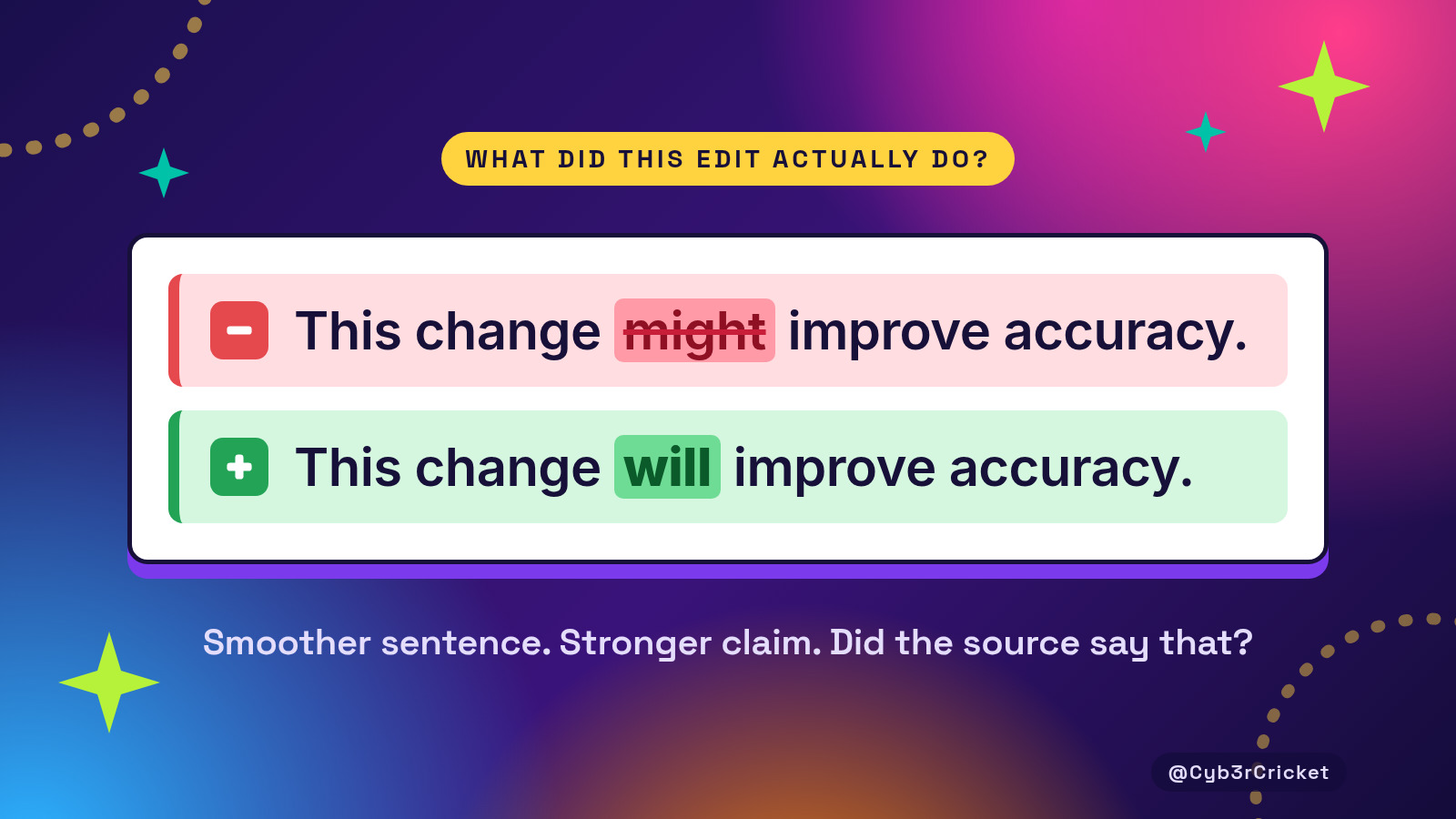
Did this edit change “might” to “will”?
That’s the type of question I keep asking myself when AI edits my writing (My grammar is awful sometimes, okay? gosh!)
Cursor can show what an edit actually changed in a draft, the same way it shows changes to code.
Have y’all used Cursor for something that had absolutely nothing to do with coding?
I’ve been looking into how people use it for research, writing, and organizing information. I wanted actual examples: what they put into it, what they asked it to do, and whether the result was useful.
Some people keep their notes in a folder and ask it to find connections. Others turn meeting transcripts into documents, keep writing samples beside a draft, or review changes to an article the way they would review changes to code.
Your notes, sources, previous work, and current draft can all belong to the same project. I like being able to work across all of it without re-explaining the project every time.
I started collecting examples from X and longer firsthand write-ups. A few workflows stood out. These are people describing their own experiences, and several date back to 2025. They give us ideas to try.
Notes that talk to each other
In a January 2025 X post, Dan Shipper described keeping his notes as text files and using Cursor Composer to find and update them. He also noted that Composer can build its own tools to reorganize, rewrite, and search the collection. [1]
That suggests a useful starting point for a research project. Imagine having several notes about the same subject, written weeks apart. You could ask which ideas appear repeatedly, where two notes disagree, or which questions you raised and never answered.
I would want the answer to point back to the specific passages. If two notes disagree, that disagreement needs to stay visible. A tidy summary that quietly picks one version would leave me with more checking to do.
Transcripts into memos
Some workflows start with a conversation.
In March 2025, Jason (@jxnlco) described keeping meeting transcripts in a directory and using Cursor to turn them into memos and other documents. [2]
A transcript contains plenty of material that needs interpretation: suggestions, decisions, questions, and things someone said while still figuring out what they meant. Turning that into a useful memo means preserving those distinctions. I’d want to check that a suggestion hadn’t become a commitment simply because the finished document sounded better that way.
Clark Dever’s October 2025 account takes a more personal approach. He describes using ChatGPT to interview him, developing an outline from the transcript, and then drafting in Cursor with his writing style guide available. [3]
I like the possibility of starting with a conversation about something you actually did. What surprised you? What went wrong? What would you do differently? Those answers could give a draft the details and phrasing that make it sound like you.
Writing context nearby
Dever’s style guide points to another habit: keeping useful writing context close to the draft.
Jorge Sancha described a writing workspace containing different types of content, background material, and instructions for particular tasks. His May 2025 account covers emails, internal documents, social posts, and longer writing. He also makes clear that he edits the generated work himself. [4]
For my own articles, I can see the appeal of keeping the source notes, draft, and a few pieces of writing I’m happy with together.
A source document and a style example would still have different jobs. One supports the facts. The other helps communicate how I want to write. I’d want those roles clearly identified, especially as the folder grows.
Reviewing the diff
This is the workflow I’d most like to spend more time with.
Dever describes using Cursor’s editing interface to compare proposed revisions, then accept, change, or reject them. He also keeps his writing in version control so he can return to earlier versions. [3]
“Diff” is the software term for showing what changed between versions. For writing, that means asking what each edit actually did.
Did it shorten a sentence? Remove an example? Change “might” to “will”? Make a claim more definite than the source allows?
Those are the changes I want to catch. A paragraph can become smoother while losing the qualification that made it accurate. Being able to inspect revisions is useful, provided I take the time to read them.
The setup tax
These workflows take some setup and cleanup.
John Fisher’s September 2025 account of using Cursor for knowledge management discusses converting material into usable text, choosing relevant context, reviewing the output, and polishing documents afterward. He also describes limitations with visual formatting and collaboration in his setup at the time. [5]
That’s useful context for anyone tempted to move an entire pile of documents into a folder and expect everything to work beautifully. I’d start with a small project and find out what needs preparation. If a PDF table gets mangled during conversion, the rest of the research can inherit that mistake.
Cursor’s current documentation does include file search, reading and editing files, web search, terminal commands, and browser tools. So it can gather new material, not just work with what you have. [6]
The model matters, too. These examples span different models and versions of Cursor, so a workflow that worked for someone using Claude or an unnamed model doesn’t tell us how Grok 4.7 will handle the same task. The next article in this series puts these workflows to Grok 4.7 to see how it holds up.
For now, what interests me is the working arrangement: a project where the material stays available while you question it, write about it, and revise your work.
If I were trying this from scratch, I’d choose one subject and a handful of notes. I’d ask it to identify agreements, disagreements, and unanswered questions, with passages attached. Then I’d check whether that helped me understand the material better.
Have y’all tried using Cursor this way? I’d love to hear what you actually used it for, what helped, and what you had to fix yourself.
Sources
- [1] Dan Shipper (@danshipper), X post, Jan 28, 2025. Notes organization and knowledge management with Cursor Composer. https://x.com/danshipper/status/1884277840872349703
- [2] Jason (@jxnlco), X post, Mar 5, 2025. Meeting transcripts used for memos and other documents. https://x.com/jxnlco/status/1897434965987746141
- [3] Clark Dever, “Why I Write With Cursor,” Oct 7, 2025. https://www.clarkdever.com/blog/why-i-write-in-cursor
- [4] Jorge Sancha, “Cursor is my new Google Docs,” May 5, 2025. https://jorgesancha.substack.com/p/cursor-is-my-new-google-docs
- [5] John Fisher, “Beyond Code: Using Cursor IDE for Knowledge Management,” Sep 16, 2025. https://spin.atomicobject.com/cursor-ide-knowledge-management/
- [6] Cursor documentation, “Cursor Agent.” Accessed Oct 7, 2026 (America/Chicago). https://cursor.com/docs/agent/overview